
Automatic Payment Links for Failed Payments.
Collect failed payments with payment links
When an automatic payment fails, the bill can stay in Transaction Processing. To collect the payment, you can send the customer a payment link, or turn on automatic payment links so JRNY Operations emails them for you.
When the customer pays through the link, the payment is applied to the same bill and transaction, and the bill is marked Paid. You don’t need to cancel the payment or create a new bill.
Note: Sending a payment link, automatically or manually, turns off automatic retries for that payment.
Turn on automatic payment links
- Go to Settings > Admin > Billing Configuration.
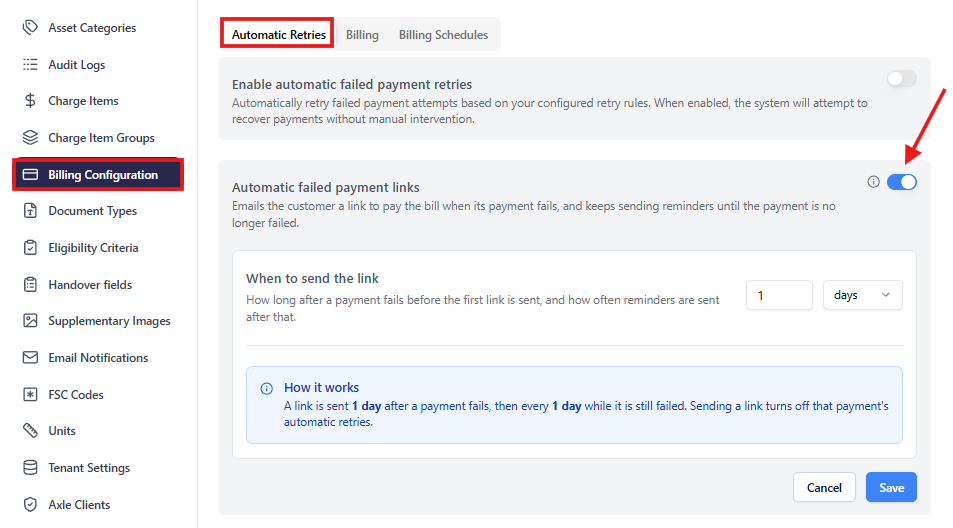
- On the Automatic Retries tab, turn on Automatic failed payment links.
- Under When to send the link, set how long to wait after a payment fails before sending the first link. Reminders are sent at the same interval until the payment is no longer failed.
- Click Save.
For example, if you set 1 day, the customer receives a link 1 day after the payment fails, then a reminder every day until they pay.
You need access to Settings to change this setting.
Send a payment link manually
To send a link straight away:
- Go to Finance > Payments and filter Status by Failed.
- Click the ⋯ menu next to the payment and select Send Payment Link.
You can only send a link for a failed payment. If the payment is still Processing, wait for it to complete or fail.

What the customer receives
The customer receives an email using the same template as the one sent when a bill is raised. It tells them that their payment has failed and asks them to click the link to complete it.
Article by Shreyash Joshi
Please note:
- The JRNY platform is constantly evolving and new features and functionalities are added all the time. We are constantly updating the Knowledge Base, but some instructions and/or images you see in these articles may vary slightly from what you can see in your own environment. Get in touch with support@tomorrowsjourney.co.uk when in doubt.
- Some features and functionalities may require configurations or additional development to work in your environment. Please speak to us if you have any questions.