
Understanding Credit Notes in New Ledger
A Credit note is used to cancel or reduce a bill that has already been issued. In TJ Ops, bills with Paid, Partially Paid, or Unpaid status can be cancelled by issuing a credit note.
Issuing a credit note adjusts the bill amount and, if payment has already been made, triggers a corresponding refund for the credited amount.
In JRNY Ops, Credit notes are issued from the Bills Module. All credit notes issued in the system can be viewed in the Credit Notes sub-module. This is a read-only submodule where you can view and download credit notes that have already been issued.
Credit notes can be issued for the full bill amount or a partial amount, depending on what needs to be cancelled.
To learn more about issuing a credit note, please check these articles:
- Issue a credit note for an unpaid Bill in the New Ledger
- Issue a credit note and refund payments for a paid Bill in the New Ledger
How does a Credit Note appear in the system?
In TJ Ops, credit notes issues can be found under the Credit Note sub-module. The purpose of the credit notes module is simply to view credit notes that have already been issued, all together in one place.
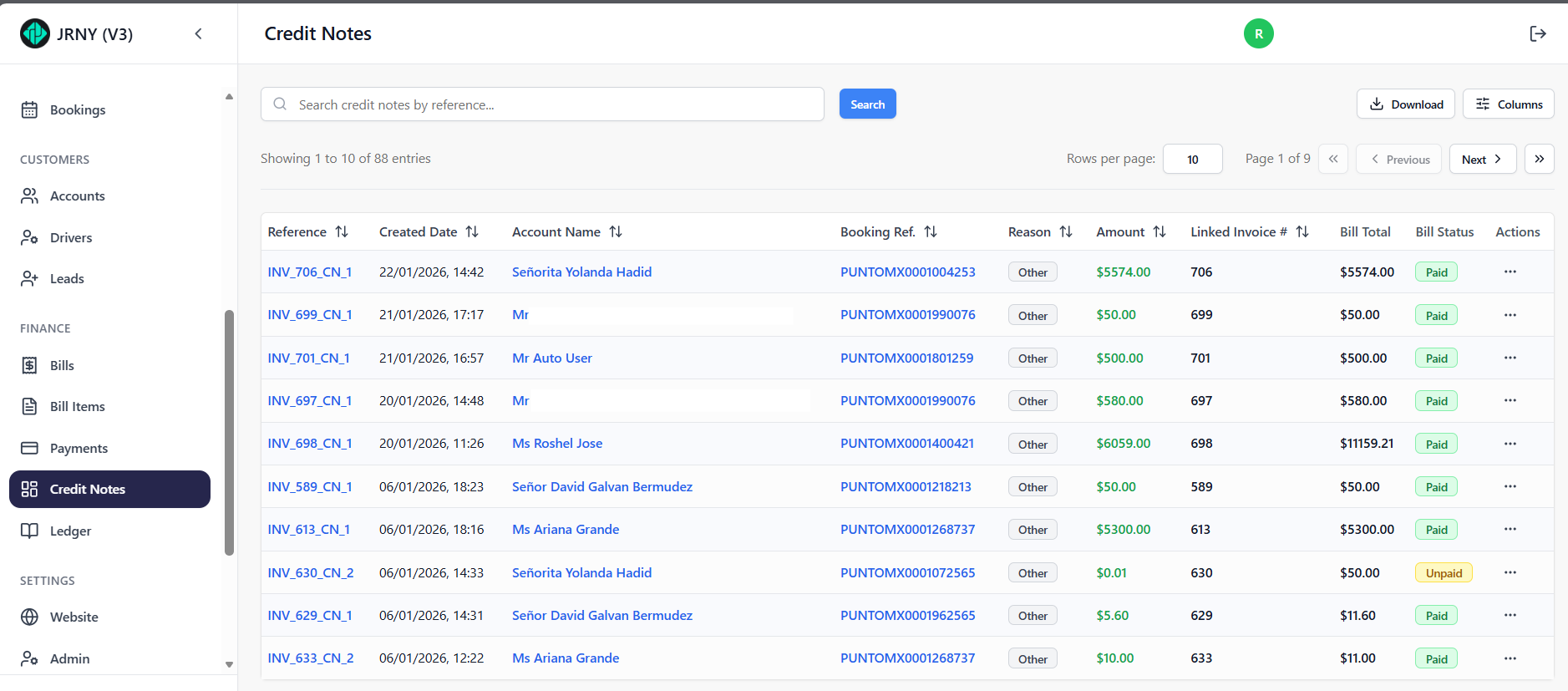
The Reference column displays credit note references created against various bills in the system. The reference sequence indicates the bill number for which the credit note was issued. “CN” stands for Credit Note, and the suffix (_1, _2, etc.) denotes how many credit notes have been issued against the same bill.
At a glance, you can view details such as the booking reference, the reason for issuing the credit note, the total amount, the linked bill number, the bill total, and the payment status (paid or unpaid).
The Actions button available against each credit note allows the user to navigate to the linked bill and download the credit note
In the Bill Items sub-module, there is no separate entry created for a credit note. Instead, a credit note can be identified by a negative amount shown under the Adjustments column in the Bills module.
A bill with a credit note will display a Paid status. If the bill has been fully credited, the amount due will be 0. If it has been partially credited, the remaining amount will continue to be payable and will be seen in the amount due.
Here is an example of a Bill before and after a credit note (in the case of a full credit note).


When to issue a Credit Note?
Credit notes are typically used to correct billing errors, apply cancellations, or refund customers for charges that should not have been collected.
Which Bill types can be issued a credit note?
- An Unpaid Bill : Bills with a due date in the future, as well as bills where a payment attempt has already failed.
- A Partially Paid or Paid Bill
Bills with statuses such as Draft, Transaction Processing cannot be issued a credit note until the status changes to Unpaid or Paid.
Article by Roshel Jose
Please note:
- The JRNY platform is constantly evolving and new features and functionalities are added all the time. We are constantly updating the Knowledge Base, but some instructions and/or images you see in these articles may vary slightly from what you can see in your own environment. Get in touch with support@tomorrowsjourney.co.uk when in doubt.
- Some features and functionalities may require configurations or additional development to work in your environment. Please speak to us if you have any questions.